



Please provide your contact information
so we can contact you later
Name
Phone / WeChat / Email
Remarks
Please provide your contact information
so we can contact you later
Name
Phone / WeChat / Email
Remarks


The Latest Amazon Brand Registration Process in 2024: A Guide to Getting Approved on Your First Attempt—Save It Now!
2024-09-18
Amazon Brand Registry enrollment has become an essential step for Amazon sellers!
It can prevent unauthorized reselling and protect against infringement, while also increasing brand and product exposure, boosting sales, and offering many other benefits!
However, because the brand registration process involves multiple steps and Amazon’s rules are subject to occasional changes, many sellers still encounter various issues.
Specially presented by Sanqian【Latest Amazon Brand Registry Process for 2024】Helping you complete the filing smoothly~
Recordal preparation
① Querylawyerwhether it is presentAmazon Blacklist(If you are unsure, you can contact the editor at the end of the article for assistance)
② Clear and authentic brand logo image
③ Trademark Registration Number or Application Number
④ Clear, with a permanent trademark nameActual product photos
⑤ Purchase invoices or contracts from the past six months
⑥ Trademark application acknowledgment receipt or trademark registration certificateor trademark license agreement
⑦ Identification card or business license of the trademark holder
Tip: It is recommended that all files useWon the “Excellent Cross-border E-commerce Brand Enterprise” award at the 2020 Global Cross-border E-commerce Festival;Naming is required, and it is recommended to use a purchase contract.Chinese and English, or entirely in English.
Specific Filing Procedures
1. Filing Portal
1. Open the official Amazon Brand Registry website and log in to your account.
Official website: https://brandregistry.amazon.com/home
2. Choose a path: Manage—Trademark Registration
Either of the two “Registered Brands” in the upper-left corner or on the right can be used to initiate the brand registration process; you may select either one.
2. Click to register yourproductBrand
3. Enter trademark information
1. Enter the trademark name, preferably using the same capitalization as on the official website;
2. Upload the trademark logo (LOGO)
Trademark Office official website: https://tsdr.uspto.gov/
Select the corresponding national trademark office, enter the trademark registration number/application number, and click Verify.
IV. Brand Owner Verification
New accounts must verify that they are the brand owner;Most existing accounts do not require verification.
1. If the store owner is also the trademark owner, select the first option.“Yes, I am the trademark owner.”
— Upload the trademark registration certificate for the ® symbol and the application receipt for the ™ symbol.
2. If the store owner and the trademark owner are different, select the second option.“No, I’m not the one who can represent and manage the brand.”
—A brand authorization letter is required. Combine the authorization letter with the trademark certificate or acknowledgment receipt into a single PDF for upload.
3. If this is the third scenario, you must provide a license agreement or contract issued by the brand owner, a copy of the brand owner's business license or ID card, and the trademark certificate or receipt, all combined into a single PDF for upload.
5. Select the category that describes the brand
1. Select the Amazon category corresponding to the trademark (it is sufficient to match the trademark subclass; no need to select many).
2. The ASIN may be left blank, and the brand's official website URL may also be left blank.
3. Enter the product information and upload a clear, real-life photo showing the logo.
VI. Sales Account Information
Select “Seller” and fill in the relevant company information.
If “Seller” did not select “Supplier,” the Amazon supplier code must be provided.
7. Invoice Contract
Choose to produce it yourself: submit a business license + sales invoice;
If you choose to sign a procurement agreement with a third party, provide the procurement contract and procurement invoice.
Note:The trademark name registered for recordal must be indicated on the purchase contract and invoice, and it is recommended to use the English name for the document name.
All filing information has been entered. Click Submit to complete the process.
8. View Filing Cases
After submission, you can view the recordation case in the issue log.
If everything goes smoothly, approximately… 3–7 daysYou will receive a case requiring a verification code. At that point, you can take a screenshot of the email and ask the agent to obtain the verification code;
After obtaining the verification code, click “Reply” for the relevant case, then copy and paste the verification code into the reply box. No other content is required.
Click submit and wait for Amazon to review. Generally, the registration can be completed on the same day or the next day.

Frequently Asked Questions on Filing
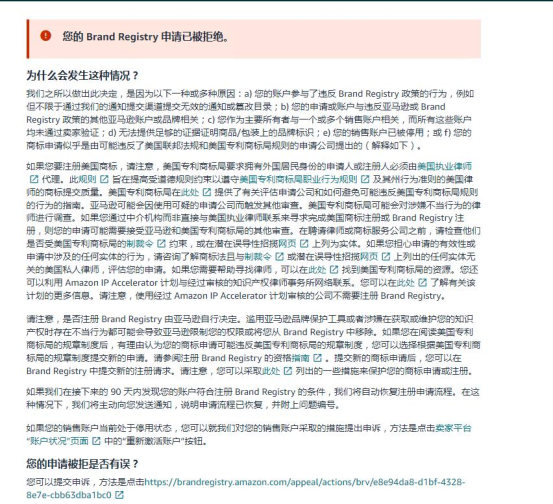
If the following pop-up appears immediately when you click Submit after completing the filing process:
“Your Brand Registry application has been rejected”
1. Check whether the trademark attorney is on Amazon’s blacklist; this is required only in the United States (you may consult the attorney).
2. Whether the account has any unresolved violation notices (the same set of information used on different sites may also be affected).
3. Whether other sites using the same set of materials have been activated, and whether the materials are incomplete, such as the payment account details.
Once all the above issues have been verified and found to be in order, or have been resolved, click the Appeal button to submit an appeal.
Points prone to errors during filing require special attention ↓↓↓
① The brand name has been entered incorrectly.
② Errors in the provided logo image, emblem, and other design materials
③ Incorrect trademark type selected (for any mark that is not word-only, select the design option)
④ Incorrect status selected (select “Pending” for all cases without an issued certificate, and “Registered” once the certificate has been issued)
⑤ The product image does not comply with the requirements (other brand names are visible, other letters are larger than the brand name, the background is white, and there are signs of image manipulation, etc.)
⑥ Information discrepancy (a letter of authorization is required)
⑦ If the lawyer is unable to complete the filing, there is a risk of immediate rejection; if a brand has previously been removed from this store, the application will be rejected instantly within 90 days.
⑧ In the latest version, if “No” is selected in the company section of the tax ID information, the appeal form will not be displayed. If “Yes” is selected and the information does not match the backend data, an appeal list may be displayed.
This is the entire process of Amazon brand filing.
As long as you prepare thoroughly, complete the required information, and pay close attention to detailsBasic registration is usually successful on the first attempt!
If you encounter any issues during the filing process or need more information, please contact us.
Welcome to addDamai Intellectual Property (WeChat: Damai_Maijia)We’ll assist with filing and resolve any issues~
If you need professional infringement settlement services or want to know if your product infringes on intellectual property rights, please consult Damai Intellectual Property!
In wind and rain, Damai Intellectual Property has always been with you on your journey of cross-border brand and product expansion!


